

Where IV Agents come to learn, grow, and stay in the know.
As small business owners, we wear so. many. hats.
We’re supposed to market our businesses while also making sure a client gets a seat on the left side of the airplane on a flight with only five seats left, becoming an expert on a destination we’ve never been to because someone wants a quote tomorrow, remembering who still needs to sign their terms and conditions, making sure we offered trip insurance, and handling the dozen other things that popped up while we were doing all of that. Some days, it’s a lot!
But marketing our businesses is part of being an independent travel agent, especially when you are still trying to build your client base.
As you grow your business, you’ll start getting more referrals and repeat clients, but for now, you need to get your name out there and find new clients. That’s why learning how to manage your time, and make the most of the work you’re already doing, is so important.
One of the easiest ways to get more mileage out of the work you are already doing is to repurpose it.
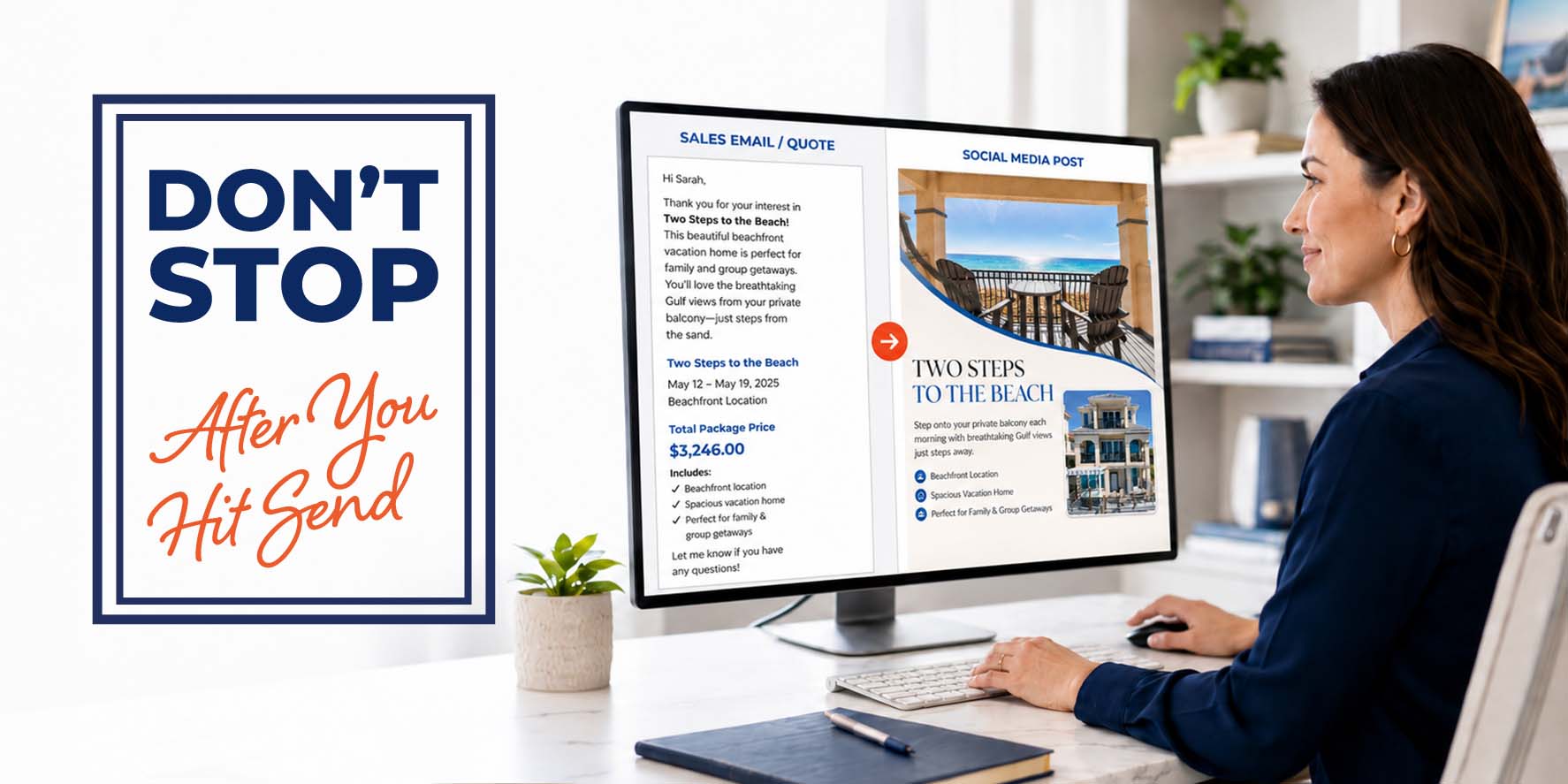
Whether you created a sales email in VAX or Expedia TAAP or built the quote yourself, think about how you could reuse the information once it has been sent to your client.
Even if the trip was originally created for one specific traveler, there is a good chance other people in your audience would be interested in something similar.
If you are promoting a specific hotel or resort, your social media graphic might include:
If the itinerary itself is the selling point, focus less on one particular hotel and more on what makes the overall vacation appealing. Think about the destination, experiences, length of stay, itinerary highlights, and the type of traveler who would enjoy it. If you’ve sold this itinerary in the past, visited a property or destination, or have first-hand knowledge of any kind, be sure to make that clear. This builds trust with potential clients. You are selling your expertise!
You do not necessarily need to advertise the exact quote you sent your client. The goal is to use the research and ideas you already gathered as inspiration for your next piece of marketing.
And remember, repurposing your quote doesn’t always have to mean turning it into just a social media graphic. Think beyond the social media post.
If you just put together a great offer for a client, think about who else in your client database might be interested in something similar. You’ve already done the research. With a little editing, that same information can become a sales email sent to the portion of your list it actually applies to.
The email doesn’t have to be fancy. You can add a few photos, or simply send it letter-style with a catchy subject line and a personal message. Email marketing is a very effective tool in your toolbox! Put those email addresses to work for you!
You can use the same idea in other ways, too. Maybe the quote becomes a Facebook ad, a new landing page on your website, or inspiration for a personal email to a past client who mentioned wanting to visit that destination someday.
You do not have to be a graphic designer to turn your quote into a polished piece of content.
Tools such as ChatGPT, Gemini or Claude can help you create the design, but the quality of the result depends heavily on the information and direction you provide. You want your post to stand out, so be sure to spend a little time on your prompts. A few extra minutes could be the difference in someone stopping or just scrolling by.
Simply asking AI to “make a travel graphic” will often produce something generic. Giving it your own photos, branding, examples, and clear instructions can make a HUGE difference!
For better results:
If you do not know the color codes for your brand colors, an online color picker such as Figma’s Color Picker can help you identify them.
One of the easiest ways to make the process faster is to create a folder or moodboard of graphics or content you like.
Instead of searching for inspiration every time you need to create something, spend a little time collecting examples of layouts, typography, photo treatments, reels, hooks and advertising styles that fit your brand. Pinterest is a great place to start. Next time you are scrolling on the couch, open up Pinterest and start working on your moodboard!
Then, when you create your next piece of marketing content, you already have reference material ready to go.
The more direction you provide, the less likely you are to end up with a busy, one-size-fits-all travel graphic and the more likely you are to create something that helps your business stand out and hopefully leads to a new client!
Here is a sample prompt you can customize:
You are the lead graphic designer and creative director for my travel agency. You create polished, high-converting marketing materials that look like they came from an experienced travel industry marketing department. Your designs are clean, modern, and professional.
Create a professional social media graphic for my travel agency in a 4:5 aspect ratio.
Use the uploaded hotel photos as the primary images. Do not make any changes to my photos beyond sizing. Include my EXACT uploaded logo and use my brand colors: [replace with your brand colors or delete this line if you do not have any].
Use the uploaded sample graphics only as inspiration for the layout, typography, and overall style. Do not copy them.
Create a clean, modern travel advertisement that does not look AI-generated. DO NOT CHANGE MY PHOTOS OR LOGO.
Avoid overly saturated colors, fake-looking people, generic travel icons, excessive visual effects, cluttered layouts, or unrealistic imagery.
Use modern typography [add your preferred fonts or font style or delete this line if you do not have any], strong visual hierarchy, balanced spacing, and plenty of negative space so the design feels clean and premium.
Headline:
[Replace with your headline.]Supporting Text:
[Paste two or three key selling points from your Sales Email or quote.]Call to Action:
Contact me today for pricing and availability!
[Tweak this to match what you want travelers to do.]Contact Information:
[Replace with your name, phone number, email address, website, and/or social media information.]
You can save this prompt and reuse it each time you create a new promotion. Simply swap out the photos, headline, selling points, and other details. Or, rework it to fit your preferences.
Pro-tip: You can also ask your AI friend to help you come up with a prompt beforehand! Then, you feed it right back to it.
AI-generated graphics should not necessarily be considered finished simply because the first version appears on your screen.
If something does not look right, tell the AI exactly what you want changed.
For example:
You can continue refining the graphic until you have something you are comfortable using.
And if you are comfortable working in Canva, Photoshop, or another design program, you can always use the AI-generated version as a starting point and make your own final adjustments.
Pro-tip: If you ask your AI to make any changes, be sure to tell it NOT to change the parts that you are happy with.
Remember, you don’t have to figure everything out on your own. If you need help marketing a group, creating a graphic, brainstorming an idea, or even learning your way around Canva, the IV Agent Support team is here to help.
Submit a ticket through DASH and tell us what you’re working on and where you could use a little help.
Marketing your travel business does not always require starting from scratch.
The quotes and sales emails you create for clients already contain valuable marketing ideas. By repurposing that work, you can create additional content without researching an entirely new trip every time you need something to post.
The next time you finish a great quote, don’t just hit send and move on.
Take another look at what you created and ask yourself:
How else could I use this?
If you have any questions, or would like to set up an appointment with Agent Support, please click the link below.


Your booking information has been received! Expect to be contacted by one of our travel gurus in the next 48 hours.
If this is an emergency trip, please call us at 800-727-0352.
Thank you for choosing International Vacations, Inc. We’ll be in touch!